Applications
Version 2.5.4
VirtualDJ Skin Resizer Tool
Skin Resizer Tool is an application that resizes the Skins used with VirtualDJ from and to any size.
All skins can now fit your screen with this tool.
Version 2 is compatible with VirtualDJ version 7 Skins.
The Skin Resizer Tool is available for 10€.
All updates are free!
Screenshot 1
2
3
4
Video Tutorial
More information...
Download:
Windows
Mac OS X
Version 2.6.0
VirtualDJ Skin Creator Tool
This application is a complete Skin editor for VirtualDJ.
Open or create a Picture from a template, and edit the XML file by selecting items on the picture.
Practically all skin engine's code is available.
Version 2 was made for VirtualDJ v6, and it keeps reverse compatibility with previous version skins.
Version 2.5 is updated for VirtualDJ v7.
The Skin Creator Tool is available for 15€.
All updates are free!
Screenshot
More information...
Download:
Windows
Mac OS X
Freeware Applications
VirtualDJ Playlist Fixer
The VirtualDJ Playlist Fixer opens VirtualDJ database and scans all playlists for missing files.
Using the database information it will fix your VirtualDJ playlists by finding the new location of moved files, and best possible matches for renamed files.
This tool also fixes VirtualFolders and the History (Tracklisting) playlists.
Mac version coming soon
Screenshot
Download:
Windows
The VirtualDJ Playlist Fixer opens VirtualDJ database and scans all playlists for missing files.
Using the database information it will fix your VirtualDJ playlists by finding the new location of moved files, and best possible matches for renamed files.
This tool also fixes VirtualFolders and the History (Tracklisting) playlists.
Mac version coming soon
Screenshot
Download:
Windows
Subtitle Cleaner
This Software is able to clean and correct subtitle files in SRT format. This format is the most used format for subtitles available for free on internet.
Open the subtitle file, or paste the text in the field on the left. Choose which options to apply. Click on Correct. And save the file.
Screenshot
Download:
Windows
This Software is able to clean and correct subtitle files in SRT format. This format is the most used format for subtitles available for free on internet.
Open the subtitle file, or paste the text in the field on the left. Choose which options to apply. Click on Correct. And save the file.
Screenshot
Download:
Windows
Realbasic Custom Controls
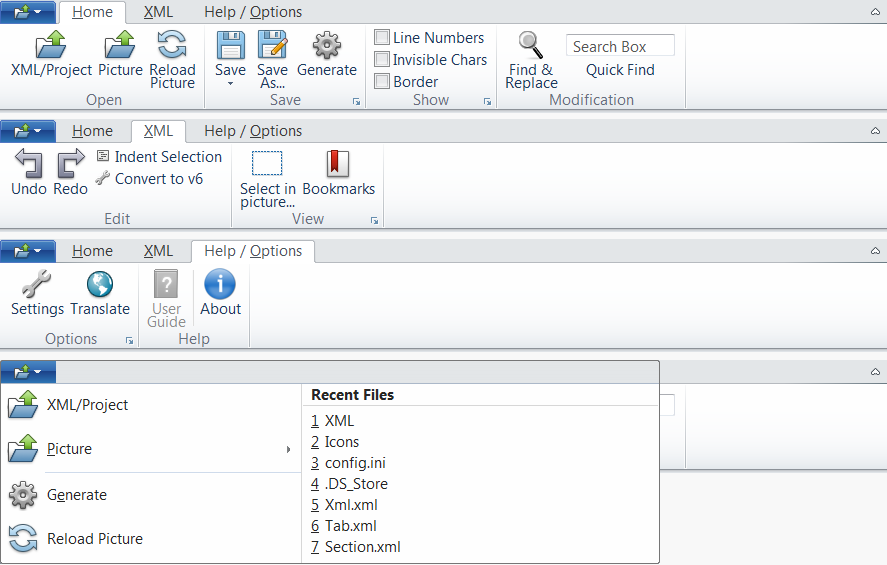
Ribbon Control
This Custom Control displays a set of tabbed toolbars.
When the width of the window containing the Ribbon is reduced, the Ribbon will automatically adapt its contents to the available width.
Buttons can be displayed vertically or horizontally.
Creating a Ribbon is very easy using the Ribbon Creator Project. This app will provide native REALbasic code and XML code that allow you to create a Ribbon in your own projects.
Check the screenshots to see how the Ribbon behaves.
Version 1.2.4 compatible with RealBasic 2011r4
Price:
60€ ($85) for unlimited use and free updates
Screenshot 1
2
3
Video Tutorial 1
2
Documentation
Download (Mac OS & Windows)
This Custom Control displays a set of tabbed toolbars.
When the width of the window containing the Ribbon is reduced, the Ribbon will automatically adapt its contents to the available width.
Buttons can be displayed vertically or horizontally.
Creating a Ribbon is very easy using the Ribbon Creator Project. This app will provide native REALbasic code and XML code that allow you to create a Ribbon in your own projects.
Check the screenshots to see how the Ribbon behaves.
Version 1.2.4 compatible with RealBasic 2011r4
Price:
| 60€ | |
| $85 |
Screenshot 1
2
3
Video Tutorial 1
2
Documentation
Download (Mac OS & Windows)
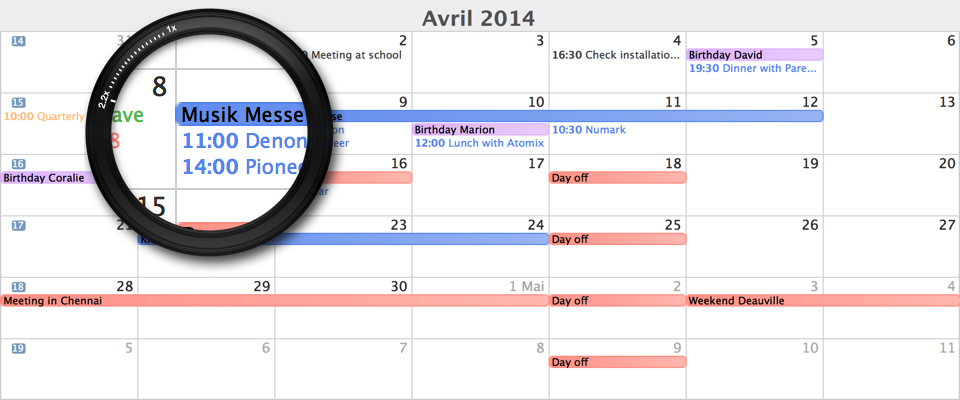
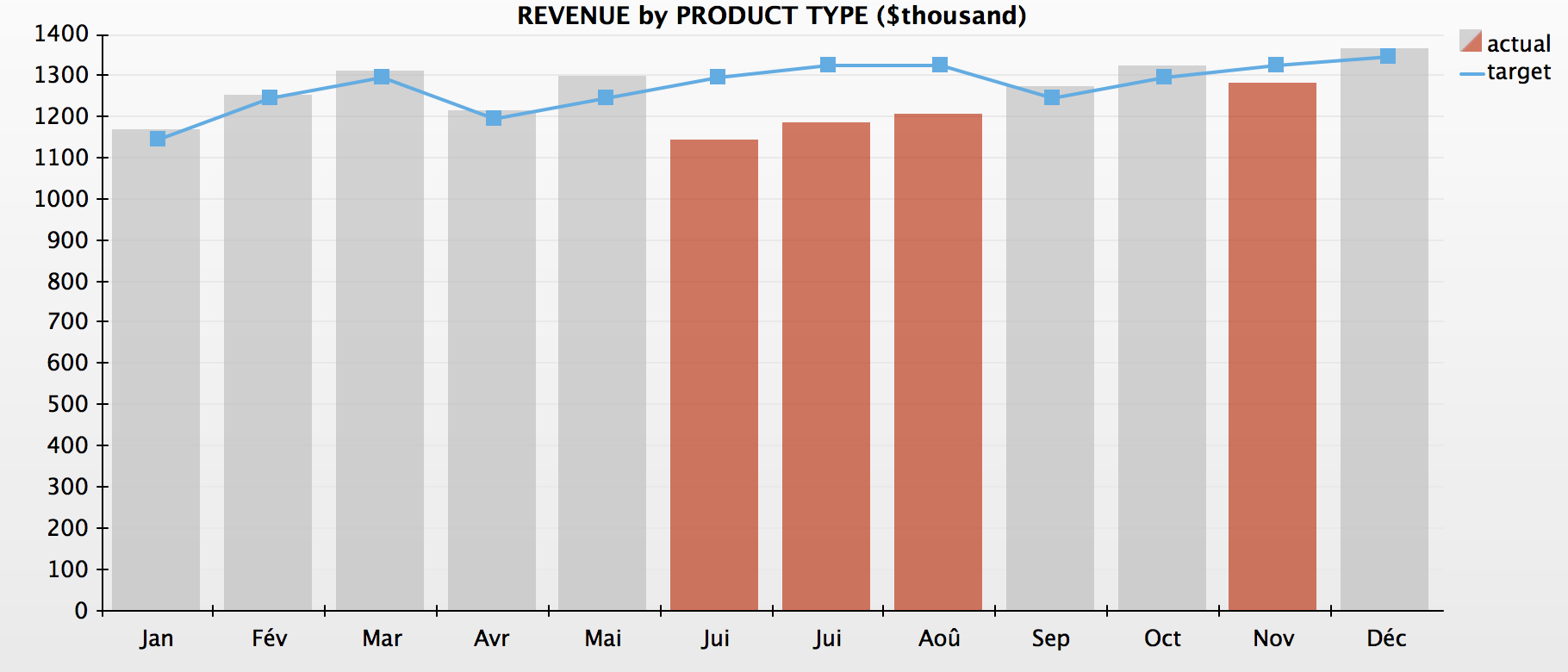
Calendar View
This Custom Control (pure RB code) displays a Calendar in different formats:
Year view Month view Week view 5 days view ...
Drag your mouse in month view and week view to create new events.
Dragging on an event enables resizing the event or moving it to another date/time.
Year view displays a "heat map" like iCal on Mac OS. The "heat map" goes from yellow to red depending on the amount of events per day.
Four different styles are included:
Default style iCal style Google Agenda style Dark style
Custom style can be implemented upon request.
Version 1.0.3 adds database features for importing and exporting CalendarEvents.
Price:
50€ for unlimited use and free updates 170€ for full source-code and free updates
Screenshot 1
2
3
4
Documentation
Download (Mac OS & Windows)
This Custom Control (pure RB code) displays a Calendar in different formats:
Drag your mouse in month view and week view to create new events.
Dragging on an event enables resizing the event or moving it to another date/time.
Year view displays a "heat map" like iCal on Mac OS. The "heat map" goes from yellow to red depending on the amount of events per day.
Four different styles are included:
Custom style can be implemented upon request.
Version 1.0.3 adds database features for importing and exporting CalendarEvents.
Price:
Screenshot 1
2
3
4
Documentation
Download (Mac OS & Windows)
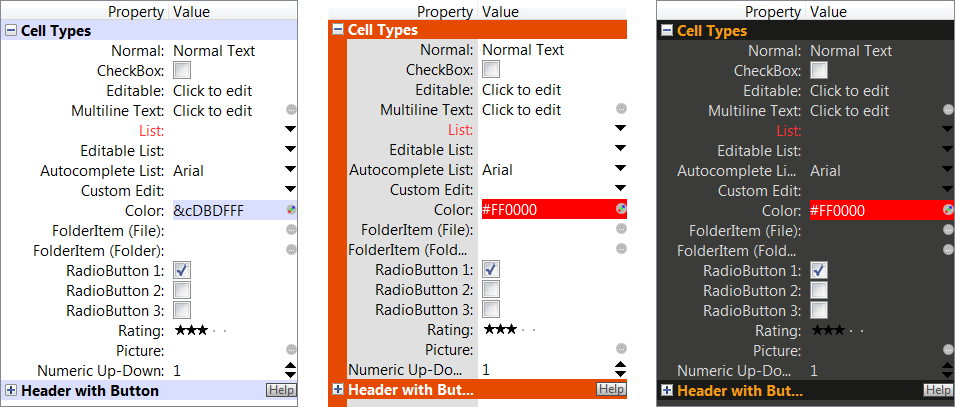
Property Listbox
This Custom Control based on a ListBox acts like REALBasic's Property Listbox displayed on the right in the Project and Window Editor tabs.
This XML-driven control is used to display and edit a list of properties.
The Property Listbox is one of the first available Listbox that has a real auto-complete feature.
Cells can take up to 10 different types (More can be added):
TypeDefault TypeNormal TypeCheckBox TypeEditable TypeList TypeEditableList (with Autocomplete option) TypeColor TypeFolderItem TypeRadioButton TypeRating TypePicture
Each Cell can have its own Helptag.
Custom cell types can be added on request.
Price:40€ ($55) for unlimited use and free updates Full sourcecode (please contact me)
Screenshot
Documentation
Download (Mac OS & Windows)
This Custom Control based on a ListBox acts like REALBasic's Property Listbox displayed on the right in the Project and Window Editor tabs.
This XML-driven control is used to display and edit a list of properties.
The Property Listbox is one of the first available Listbox that has a real auto-complete feature.
Cells can take up to 10 different types (More can be added):
Each Cell can have its own Helptag.
Custom cell types can be added on request.
Price:
| 40€ | |
| $55 |
Screenshot
Documentation
Download (Mac OS & Windows)
Toolbar
This Custom Control based on a Canvas acts like REALBasic's toolbars.
5 layouts are integrated (Big Icons, Small Icons, with labels or not...) Look at the Screenshot to get a better idea of the layouts.
Buttons can have a ContextualMenu and a HelpTag.
Text Separators can be displayed between buttons.
Version 1.2 is now compatible with RB2008 and lower.
Customized Toolbar can be done on request.
Price:
10€ for unlimited use and free updates 25€ for full sourcecode
Screenshot
Documentation
Download (Mac OS & Windows)
This Custom Control based on a Canvas acts like REALBasic's toolbars.
5 layouts are integrated (Big Icons, Small Icons, with labels or not...) Look at the Screenshot to get a better idea of the layouts.
Buttons can have a ContextualMenu and a HelpTag.
Text Separators can be displayed between buttons.
Version 1.2 is now compatible with RB2008 and lower.
Customized Toolbar can be done on request.
Price:
Screenshot
Documentation
Download (Mac OS & Windows)
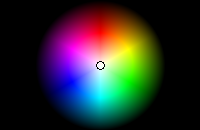
Color Wheel
This control displays a Color Wheel that enables the user to select a color.
This control can be used as a replacement for the default color selection window.
Price:
5€ for unlimited use and free updates 15€ Full sourcecode
Screenshot
Documentation
Download (Mac OS & Windows)
This control displays a Color Wheel that enables the user to select a color.
This control can be used as a replacement for the default color selection window.
Price:
Screenshot
Documentation
Download (Mac OS & Windows)
Scroll & Zoom Canvas
This custom Canvas control is for displaying a large picture. You can scroll in the picture with the scrollbars, and zoom in/out with the mouse-wheel, keyboard shortcuts or zoom buttons.
When dragging the mouse, it either creates a selection rectangle or drags the picture.
Features:
Display a large picture Double-buffered Scroll around the picture Zoom in/out (10% to 3200%) Select a portion of the picture Very fast rendering on Mac OS (less than 10 milliseconds) Fast rendering on Windows (less than 60 milliseconds) 100% Native Realbasic Code
Price:
20€ for unlimited use and free updates 85€ Full source-code
Screenshot 1
2
Download (Mac OS & Windows)
This custom Canvas control is for displaying a large picture. You can scroll in the picture with the scrollbars, and zoom in/out with the mouse-wheel, keyboard shortcuts or zoom buttons.
When dragging the mouse, it either creates a selection rectangle or drags the picture.
Features:
Price:
Screenshot 1
2
Download (Mac OS & Windows)
BBCode Static Text
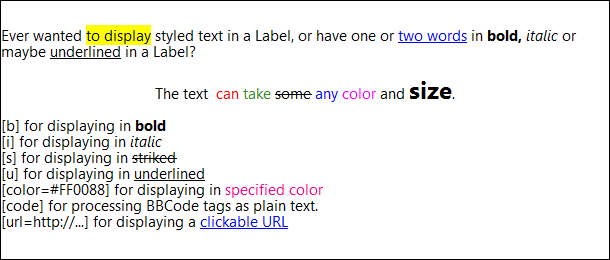
This Custom Control based on a Canvas displays text the same way a StaticText does.
But this control displays styled text and clickable URLs
The syntax of the text to display uses BBCode
The following codes are useable:
[b] [i] [s] [u] [url=...] [color=#......]
Price:
20€ for unlimited use and free updates 85€ Full source-code
Screenshot
Download (Mac OS & Windows)
This Custom Control based on a Canvas displays text the same way a StaticText does.
But this control displays styled text and clickable URLs
The syntax of the text to display uses BBCode
The following codes are useable:
Price:
Screenshot
Download (Mac OS & Windows)
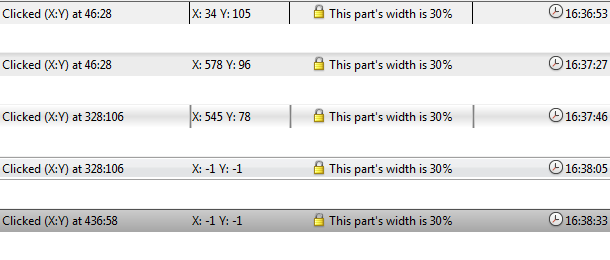
StatusBar
This Control based on a Canvas displays various information you need to show to the user of your piece of software.
Three alignments are possible for each section (Align left, center, right).
The section's width is either static (amount in pixels) or dynamic (amount in percentage).
Each section can have an icon, and an event is raised when a section is clicked.
Five different styles are available within the control,two of them were custom-made for Mac OS.
Custom graphics can be made upon request.
15€ for Full Sourcecode (free updates)
Screenshot
Download (Mac OS & Windows)
This Control based on a Canvas displays various information you need to show to the user of your piece of software.
Three alignments are possible for each section (Align left, center, right).
The section's width is either static (amount in pixels) or dynamic (amount in percentage).
Each section can have an icon, and an event is raised when a section is clicked.
Five different styles are available within the control,two of them were custom-made for Mac OS.
Custom graphics can be made upon request.
15€ for Full Sourcecode (free updates)
Screenshot
Download (Mac OS & Windows)
Disclaimer
These products are commercial software, only registered users are allowed to use them in compiled projects.
Jeremie LEROY will disable all serial numbers found on Internet and all serial numbers of decoded plugins that have illegally been posted on Internet.
Jeremie LEROY and the author, are in no way responsible for the bugs that might be found in these products. However, Jeremie LEROY will do its best to fix the bugs. These pieces of software are provided by Jeremie LEROY 'as is' without any express or implied warranties, including, but not limited to, the implied warranties of merchantability and fitness for particular purpose. In no event shall Jeremie LEROY or its developers be liable for any direct, indirect, incidental, special, exemplary or consequential damages (Including, but not limited to, procurement of substitute goods or services; loss of use, data or profits; or business interruption) however caused any on any theory of liability, whether in contract, strict liability, or tort (including negligence or otherwise) arising in any way out of the use of these plugins, even if advised of the possibility of such damage.
Officially we only support versions noted above and up to current official (not alpha or beta versions) version of REAL Studio at the date of when this plugin is published. We cannot predict what changes might come in future versions of REAL Studio.
Soon available
These products are commercial software, only registered users are allowed to use them in compiled projects.
Jeremie LEROY will disable all serial numbers found on Internet and all serial numbers of decoded plugins that have illegally been posted on Internet.
Jeremie LEROY and the author, are in no way responsible for the bugs that might be found in these products. However, Jeremie LEROY will do its best to fix the bugs. These pieces of software are provided by Jeremie LEROY 'as is' without any express or implied warranties, including, but not limited to, the implied warranties of merchantability and fitness for particular purpose. In no event shall Jeremie LEROY or its developers be liable for any direct, indirect, incidental, special, exemplary or consequential damages (Including, but not limited to, procurement of substitute goods or services; loss of use, data or profits; or business interruption) however caused any on any theory of liability, whether in contract, strict liability, or tort (including negligence or otherwise) arising in any way out of the use of these plugins, even if advised of the possibility of such damage.
Officially we only support versions noted above and up to current official (not alpha or beta versions) version of REAL Studio at the date of when this plugin is published. We cannot predict what changes might come in future versions of REAL Studio.
Soon available

Subscribe